Object-Space Normal Map
Reinterprets lilToon's main (1st) normal-map slot as an object-space normal map.
Normal maps are often in tangent space. lilToon's normal map slots are intended for tangent space normal maps also. If one has a hand painted object space normal map for stylization, normally one would need to bake it to tangent space in Blender or other DCC software. This feature allows you to use an object space normal map directly.
Enable
- Import your object-space normal map. In the importer settings, its
Texture Typeshould NOT be marked as normal map. - Assign your object-space normal map to the material's main Normal Map slot.
- Open Override Normal Map 1st as Object Space and turn it on.
- lilToon might complain about the normal map is not marked as a normal map. Press Ignore to suppress this warning.
Settings
- Override Normal Map 1st as Object Space — on = interpret the main normal map as object-space (alpha 0 = vertex normal, alpha 1 = texture normal); off = standard tangent-space normal map (lilToon default).
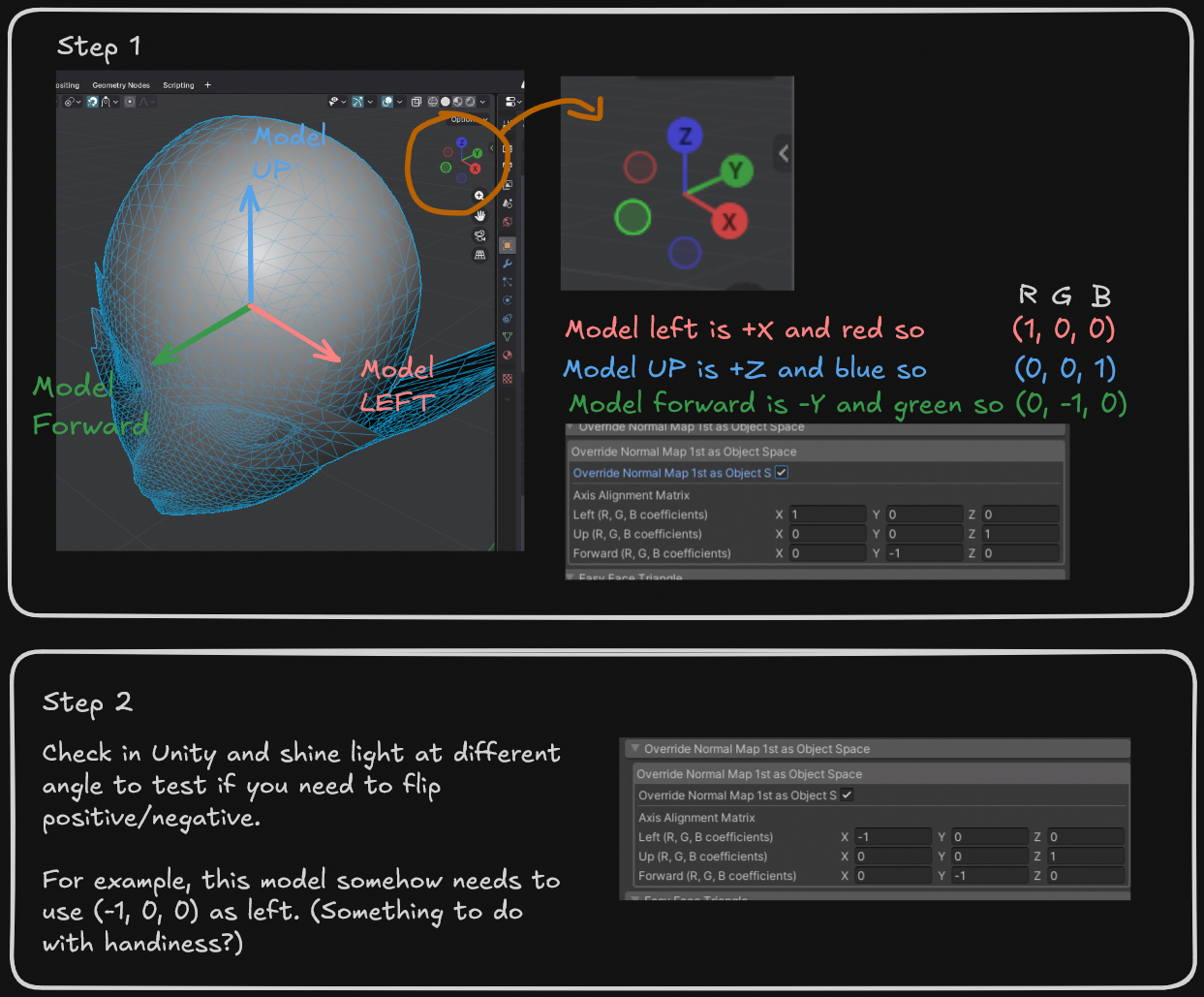
- Axis Alignment Matrix — rotates the texture's RGB axes into mesh object-space. See below.
Finding the axis alignment matrix
Each row (Left/Up/Forward) holds the (R, G, B) coefficients that build that component.
The default matches the Blender object-space bake preset. ()
However, the matrix depends on the modelling software you use and the way you orient your model. See below on finding a matrix for your model: